 Dyno
DynoBilling dates and pro-rata
When a member is actually charged, what their first payment covers, and what you can and cannot change afterwards.
Most billing questions from members are really date questions: why was I charged today, why was it a strange amount, when is the next one. The answer comes from two settings on the pricing plan, Billing anchor day and Charge pro-rata for partial first period, and from the day the member joined.
For the basics of how billing works, see How member billing works. This article covers the dates.
The two ways a plan sets the date
Both are set per pricing plan, under Billing day, when you create or edit a membership. See Create a membership plan.
- Signup anniversary: each member is billed from the day they joined. Someone who joins on the 14th is billed on the 14th of each period. Members on the same plan are all on different days.
- A fixed day of the month: everyone on the plan is billed on that day. If the day does not exist in a given month, for example the 31st in February, the charge falls on the last day of that month.
A fixed day only works when the next occurrence of that day falls within one billing period of the join date, so it suits monthly and longer cadences rather than weekly ones.
What the first payment covers
Signup anniversary. The member pays the first full period plus any signup fee when they join. The next charge is one period later.
Fixed day, with pro-rata set to Yes. The member pays a part-period amount when they join, plus any signup fee. That part-period covers the days between joining and the billing day. From the billing day they pay the full price every period.
Fixed day, with pro-rata set to No. The member pays nothing for the gap. Any signup fee is still taken when they join. Their first full charge lands on the billing day.
With a trial. The member joins straight away and is charged when the trial ends. A fixed billing day overrides the trial: if the plan has a billing day, the trial is ignored.
Why the first amount is not a round number
A part-period charge is worked out by Stripe at the moment the member joins, from the plan price and the days between joining and the billing day. Dyno does not calculate it, and deliberately never shows a member an estimate of it: the app shows Calculated at checkout instead of a figure.
The exact amount only exists once the member has joined. You can see it afterwards on their Payments tab, and on the payment itself in Finances.
What the member sees when they join
On the confirm screen in the app, under Billing Summary:
- The recurring price, labelled with the cadence, for example Monthly payment.
- Due today with the amount, when Dyno knows it.
- Calculated at checkout in place of the amount, when the join carries a part-period charge only Stripe can price.
- When nothing is due today, a line saying so, for example "No charge today. We will save your card and take your first payment of £40.00 on 1 October 2026."
Nothing due today still means handing over a card or setting up a Direct Debit. The payment method is saved so the first real charge can be taken on the billing day.
Where to see a member's dates
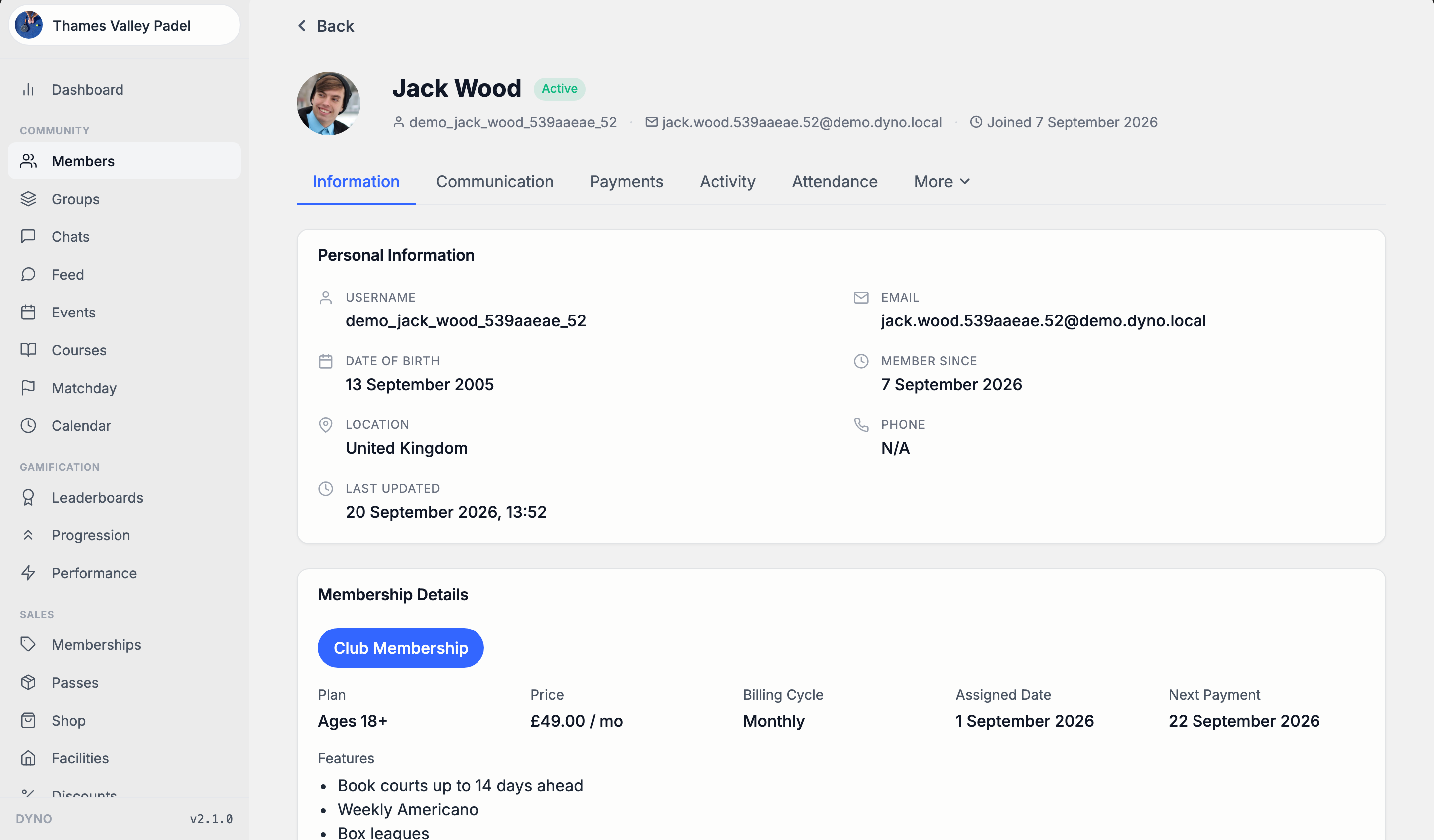
- Open Members and click the member.
- On the membership card, read Billing Cycle, Assigned Date and Next Payment.
- Open the Payments tab for every payment taken, newest first.
Next Payment shows Not billed when nothing bills that membership, for example a comp membership. That is not a missing date, it is the absence of billing.
What you can change
- The plan's billing day and pro-rata setting. Open the membership, click Edit and change Billing anchor day or Charge pro-rata for partial first period. This only affects members who join after the change. Everyone already on the plan keeps the day they were set up on.
- One member's first pro-rata charge, before they join. Tick Waive pro-rata charge on a detailed invite. See Discounts on invites.
- Pause a member's billing. Billing stops and restarts on their normal billing day. See Pause a membership.
What you cannot change
- One member's billing day. There is no setting for it in the dashboard, and editing the plan will not move an existing member. If a member genuinely needs a different day, contact Dyno support.
- The price an existing member pays, by editing the plan. New joiners pay the new price and existing members keep the one they joined at. To move a member onto a different price, see Change a member's plan.
- A payment that has already been raised. Refund it instead. See Issue a refund.
What changes on renewal
A renewal invoice carries the recurring price and nothing else. The signup fee is a first-invoice item and is never charged again.
Watch for these on the renewal after a join:
- A discount set to apply once, or for a set number of months, runs out and the price goes back up. See Discounts explained.
- Max Billing Cycles ends the plan once it has billed that many times, and the member stops being charged.
- A cancellation with a notice period still charges a renewal that falls inside the notice. See Cancel a membership.
Direct Debit dates
A Direct Debit is raised on the billing date and collected by the bank several days later, so the two dates differ. The Payments tab shows the raised date and, once it lands, the settled date. See Direct Debit for memberships.
If a payment does not go through, see Failed payments.