 Dyno
DynoDirect Debit for memberships
Turn on UK Direct Debit, how a member sets up a mandate, what you see while it clears, and how it differs from card.
Direct Debit is for recurring memberships only. One-off purchases such as events, day passes and packs always take a card, whatever you set here, because Direct Debit takes too long to clear for a small one-off amount.
Direct Debit runs on your own Stripe account, like every other payment. Your club is the seller and the money lands in your Stripe balance. See Connect Stripe.
1. Check Stripe has enabled it
- Open Settings and choose Payments.
- Find the Payment methods card.
It lists Card payments and Bacs Direct Debit with a status each:
- Active: ready to use.
- Pending verification: Stripe is still checking. If it needs anything from you, the card lists the details it is waiting for.
- Not enabled: Direct Debit is not available on your account yet.
Card payments are ready by default once your Stripe account is connected. Direct Debit needs UK Bacs verification, and Stripe usually asks for a few extra details after onboarding. Complete those in your Stripe dashboard and the status here updates on its own.
2. Choose what members can use
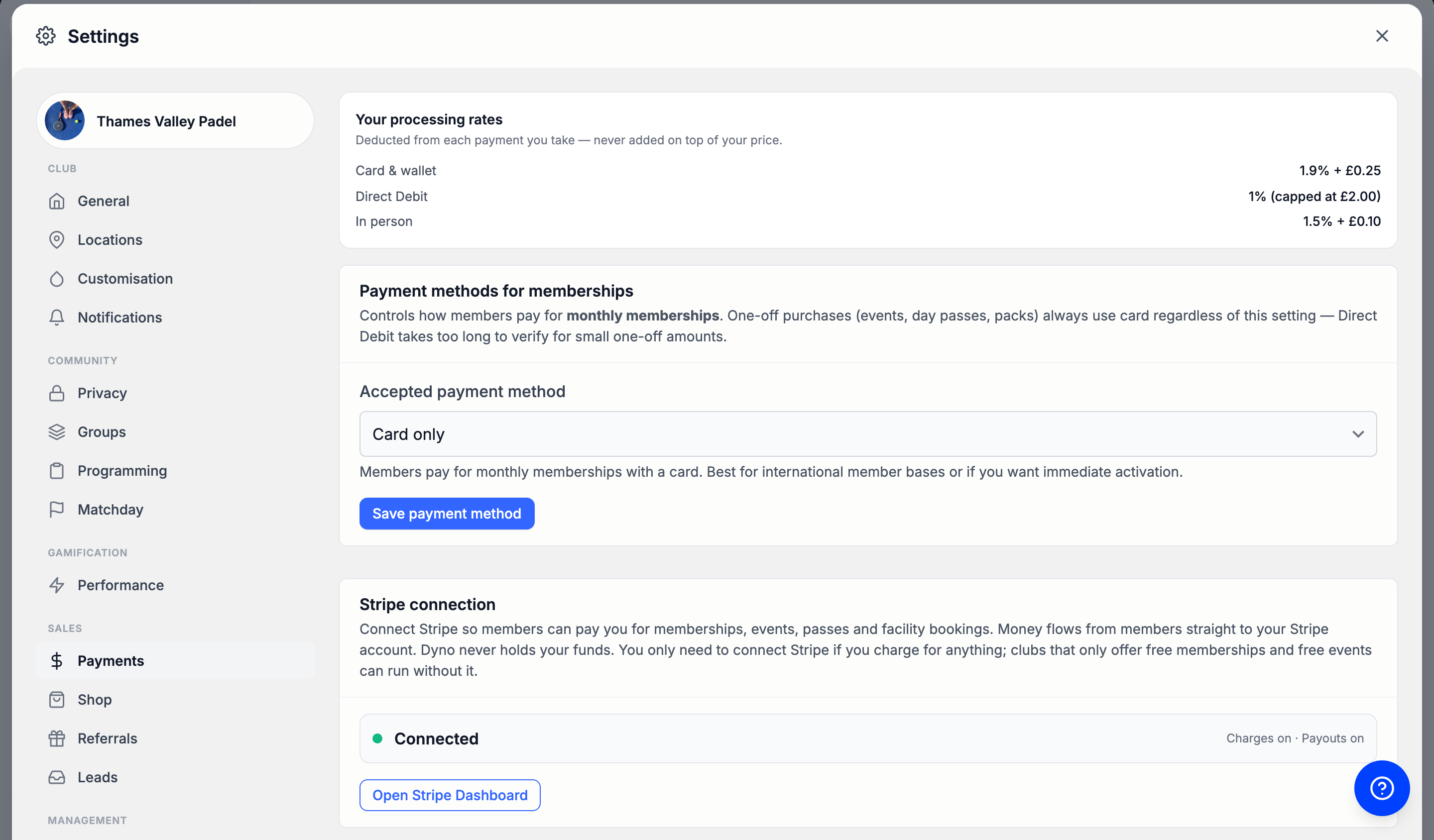
- On the same Payments tab, find Payment methods for memberships.
- Set Accepted payment method to one of: - Card only - Direct Debit or Card (Member has both options) - Direct Debit only (UK)
- Click Save payment method.
Direct Debit only works with UK bank accounts, so Direct Debit only (UK) will lock out anyone banking elsewhere.
How a member sets one up
Direct Debit is mandate first. The mandate has to exist before the membership can be created against it, so the app collects it as a separate step.
- The member picks a membership and reaches the confirm screen.
- Under Payment method they tap Direct Debit. The screen tells them their first payment will come out approximately 4 working days from now, and that Direct Debit only works with UK bank accounts.
- They tap through to pay. Stripe's sheet opens on the Direct Debit form, showing your club as the party being authorised, along with the Direct Debit Guarantee.
- Once they authorise it, Dyno creates the membership against that mandate and requests the first payment.
- They see a Direct Debit set up panel confirming the mandate and that the first payment has been requested.
If the member backs out of the mandate sheet, nothing is set up and nothing is charged. If Stripe cannot create the mandate at all, they are told Direct Debit is unavailable and asked to use a card, where your club allows one.
A member cannot add a Direct Debit later from their payment settings in the app: that screen adds cards only. A mandate is set up when they buy a membership.
What you see while it clears
On the member's page:
- The Payments tab shows a Payment method panel. For a Direct Debit it reads Direct Debit with Direct Debit mandate is active and an Active tag.
- Each payment shows the date it was raised. Once the money lands, the same row also shows the date it settled. Until then its status is Pending.
- The Activity tab says the same thing in words: the purchase first reads that the first payment is awaiting Direct Debit settlement, and later that the amount was collected by Direct Debit on the day it landed.
When the member gets access
As soon as the first collection is submitted, before the money arrives. The mandate has been accepted at that point and the payment is on its way, which is the usual convention for a UK club.
If that first collection then fails, the membership is removed straight away. There is no grace period for a first payment that never cleared. Once a member has one settled payment behind them, a later failure follows the normal route: Stripe retries, the member is chased, and they keep access while that is happening. See Failed payments.
If the member cancels the mandate at their bank, or the bank refuses it, the membership ends. Dyno notifies the member so they can set their details up again, which means buying the membership again.
When your club gets the money
A Direct Debit is raised on the billing date and takes several working days to reach your Stripe balance. Until it does, it counts towards Still settling rather than Awaiting next payout on the Finances page. See Payouts to your bank.
How it differs from card
- Timing. A card is charged immediately. A Direct Debit is requested on the day and arrives days later, both for the member's first payment and for every renewal.
- Access. Card access is immediate and proven. Direct Debit access is given on trust while the first payment clears, and withdrawn if it does not.
- Failures. Cards expire, get cancelled and get replaced, and Dyno warns members before a card on file expires. A mandate does not expire, so there is no warning to send, but a member can cancel it at their bank without telling you.
- Coverage. Direct Debit is UK bank accounts only. Cards work anywhere.
- Setup. A card is one step at checkout. Direct Debit is two: the mandate, then the membership.
- One-off sales. Always card, for both.
Members moving from another provider
A member who is still paying your previous provider can be held on a comp membership while their Direct Debit transfers to Stripe. Their page says Awaiting Direct Debit transfer: they have full access, Dyno collects nothing, and their Payments tab stays empty on purpose.
There is nothing to do while that is true. They are moved onto billing for you once the transfer lands, and only then is the old Direct Debit cancelled. Starting billing by hand before that charges them twice, and the dashboard makes you tick a box to confirm you understand. See Change a member's plan.
For what a member is charged and when, see Billing dates and pro-rata.